Search for music and explore available MP3 audio or MP4 video downloads.
MP3 Juice
Welcome to Mp3Juice, where you can search for a recording by song title, artist name or YouTube URL. Review the matching entries, listen with Play when available and open Download to see conversion choices. Select MP3 for audio or MP4 for video when the source offers your preferred format.
Popular Music
Songs and artists to put on your next listening list.
Begin with the search form, choose a matching recording and review its download options. The three screenshots show the controls you will use along the way, from entering a query to selecting an available format.
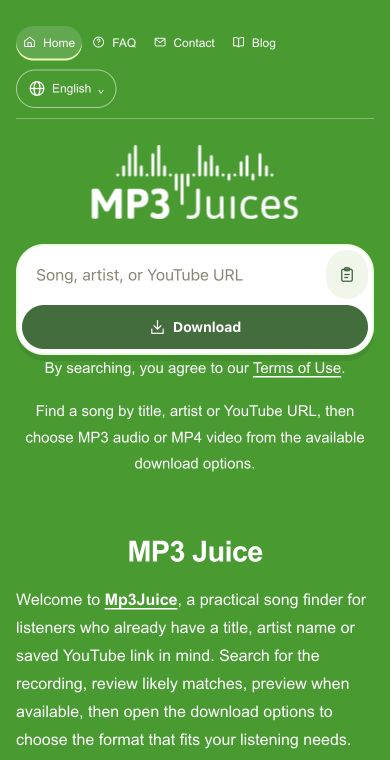
Enter a song title, an artist name or a YouTube URL in the search field, then use Download on the form. For a named search, include the details that distinguish your track. A specific title and performer can make similar recordings easier to tell apart.
1The first screenshot shows the search field where you enter a song, artist or YouTube URL.
02
Select the match you want
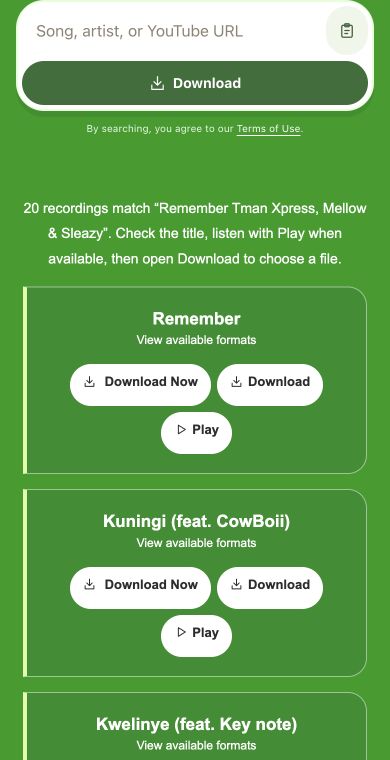
Look through the returned entries for the recording you intended. Compare the performer, title and any version details rather than choosing by name alone. If Play is available, listen to check the match. Select Download beside your chosen entry to open its conversion choices.
2The second screenshot highlights the Download control in the results for opening conversion choices.
03
Open Download options
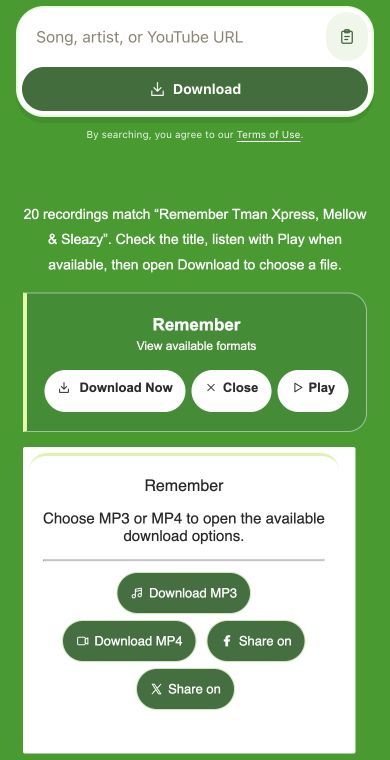
Review the options displayed for your selected source. Choose MP3 if you want audio, or MP4 if you want video and that choice is offered. Availability differs between sources, so an entry may not include both formats. Base your selection on the options actually shown.
3The third screenshot shows the MP3 and MP4 choices for available audio and video downloads.
Everyday music search made practical
Start with whatever identifies the music you want, whether that is a title, performer or particular video. The results let you compare recordings before opening a download option.
Search without signing in
You do not need an account to search. Go straight to the form, enter your query and review the matches. An artist name can be a useful starting point when you are exploring, while a specific title helps when you already have a song in mind.
Use current music lists as a starting point
If a chart or playlist introduces you to a song, use its title and performer as your search terms. Search for the individual track rather than the entire list. This gives you a clearer basis for comparing the returned entries with the recording you heard.
Check playable results before saving
A title can refer to a studio recording, cover or live performance. Use Play when it appears to hear which version an entry contains. Listening for the singer or arrangement can help you decide whether to continue to that result's download choices.
Better searches for closer results
Small changes to your query can make matching entries easier to recognize. Focus on the music's identifying details, not broad phrases about finding free downloads.
Use the performer and song name together
Combine the artist with the track title when several songs share a name. If you want a particular performance, add a relevant term such as live, acoustic or remix. Check that the returned entry reflects those details before selecting it.
Paste the link when the exact video matters
For a video you have already identified, paste its YouTube URL into the search field and use Download on the form. This starts with that source instead of a name-based query. The source still needs to be available for conversion options to appear.
Supporting services for different music tasks
Choose among the sections on this website according to your starting point. Mp3Juice focuses on song searches, Tubidy on mobile browsing, Fakaza on regional music discovery and Ytmp3 on working from a selected video. Review the relevant section's entries and options before deciding what to download.
These names identify sections on this website. Available sources and formats vary.
Format choices after the song is selected
Choose according to whether you want sound alone or sound with picture. Source quality limits conversion quality. Changing the output format cannot restore audio or visual detail that the original recording does not contain.
MP3
MP3 for audio listening
When MP3 is offered, choose it for the recording's audio without video. Check the version first, since spoken introductions, audience sounds and performance differences remain part of the source. An audio format does not turn a live performance into a studio recording.
MP4
MP4 for sound with picture
When available, MP4 keeps the picture alongside the sound, useful when the performance or music video matters to you. Look for the option in the selected entry's conversion choices. An audio download being available does not guarantee a video choice.
Mp3Juice download questions
Can I search with only a song title?+
Yes. Type the title into the search field and select Download. If the results include different songs or performers, try another search with the artist's name included.
Where should I enter a YouTube URL?+
Paste it into the same field used for song searches. Select Download on the form, review the returned entry and open its Download control to see available conversion options.
Will every entry offer both MP3 and MP4?+
No. Format choices depend on the selected source and its availability. Check the options shown for that entry rather than expecting every result to provide audio and video.
Is an account required to search?+
No account is needed to search. Enter a song, artist or YouTube URL directly in the form, then browse the matching entries to find the recording you want.
Is Mp3Juice affiliated with Tubidy, Fakaza or Ytmp3?+
No. These names are used for other sections on this website. Their appearance here does not mean there is a partnership, affiliation or endorsement with those services.
What should I confirm before downloading?+
Check that you have permission to download and use the recording. Also confirm the performer and version, try Play when available and review the formats offered for your selected source.
Put a song title, artist or YouTube URL into the search field and select Download. Compare the matches, choose your recording and check its available MP3 or MP4 options.